Client Success Roundup
What we shipped last quarter, and what it changed
Three client systems we built between April and June, the real screens behind each one, and what changed for the teams running them.
DashboardLim · Founder's desk
2026-09-045 min readWe built three systems for clients between April and June. One reads a founder's inbox before they get to it, one shows a sales team whether their own automation actually fired, and one turns a stock sheet into a date to order by. Here is what each client came to us with, what we built, and what changed.
81
messages dropped by plain rules before anyone looked
100%
of deals in the window with their form and folder attached
25 days
of supplier lead time the reorder date works back from
Three systems, three real screens
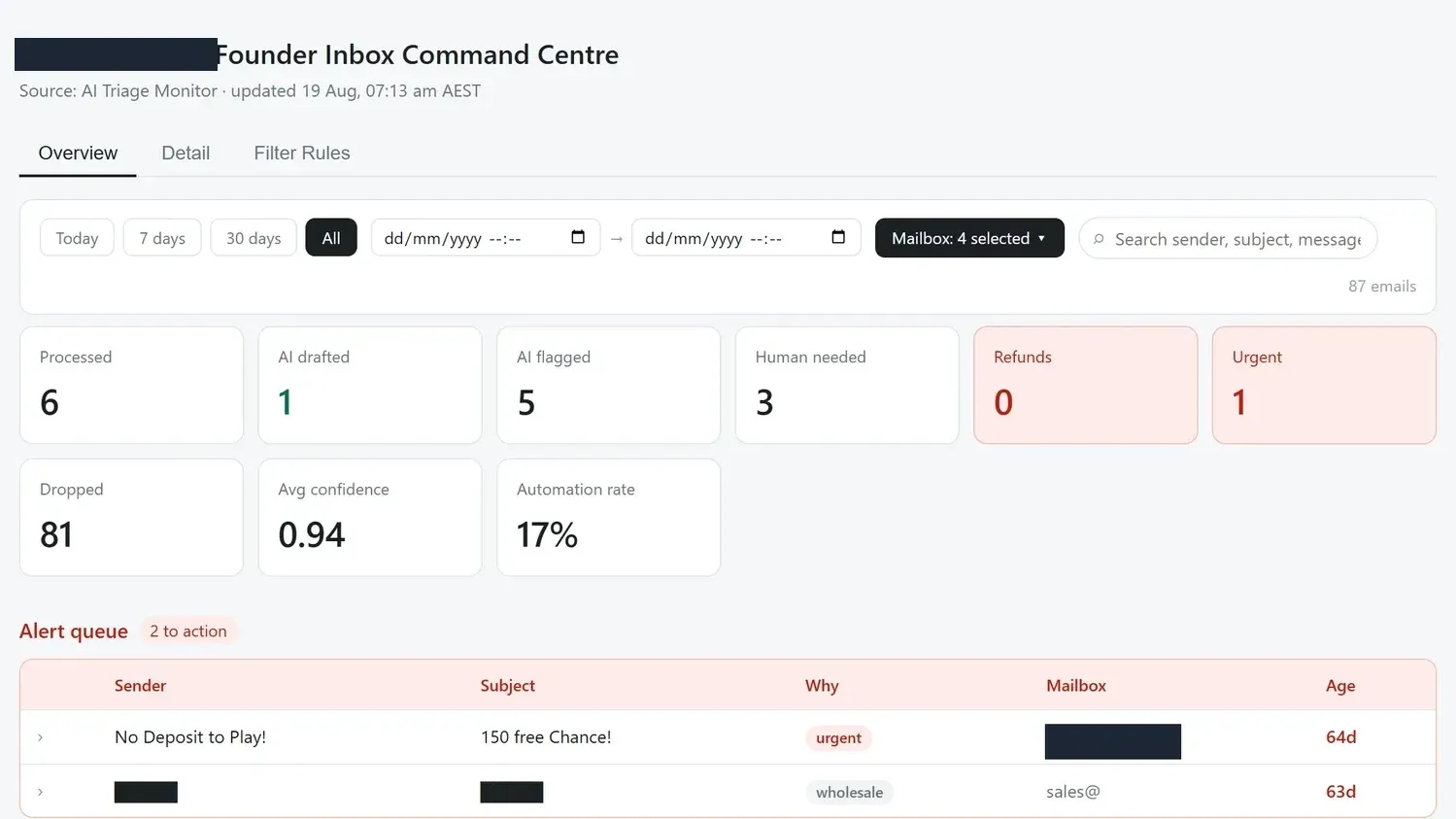
The inbox, triaged. What arrived overnight, what the rules threw away, and what still needs a person.
Every screenshot in this issue comes out of a system that is running.
System 01 · The founder's inbox
The inbox that does the looking
One of our clients, a consumer brand, came to us because their founder was starting and finishing every day in the inbox. Seven mailboxes, plus WhatsApp, social messages and marketplace chat, and around fifty customer emails a day in peak season.
What they asked for was not an AI that answers customers. It was a way to stop reading everything. So we built one triage layer across all of it, and the first thing it does is not AI at all. Plain rules, which they edit themselves, drop the newsletters and the notifications before the model ever sees them.
What survives lands in a named queue with the reason it landed there, a confidence score, and what a person should do next. Replies are drafted and wait. Refunds over an agreed threshold, anything legal, and diet-critical questions never become drafts at all. They ping a human.
What to look at
- On the day above, 81 of 87 messages never reached a person. That is the number the founder feels, not the automation rate.
- Nothing on this screen can send. The system reads, sorts and drafts. People send.
The lesson we keep relearning here is that the boring filter earns the AI its keep. Spend the model on the messages that deserve one, and let a rule anyone can edit handle the rest.
System 02 · Sales visibility
The dashboard that checks our own work
Another client, an Australian property investment advisory, had the opposite problem. Plenty of automation, no way to see whether it had actually run. Deals moved, forms were supposed to fire, folders were supposed to appear, and nobody could say for certain that any of it happened on a given deal.
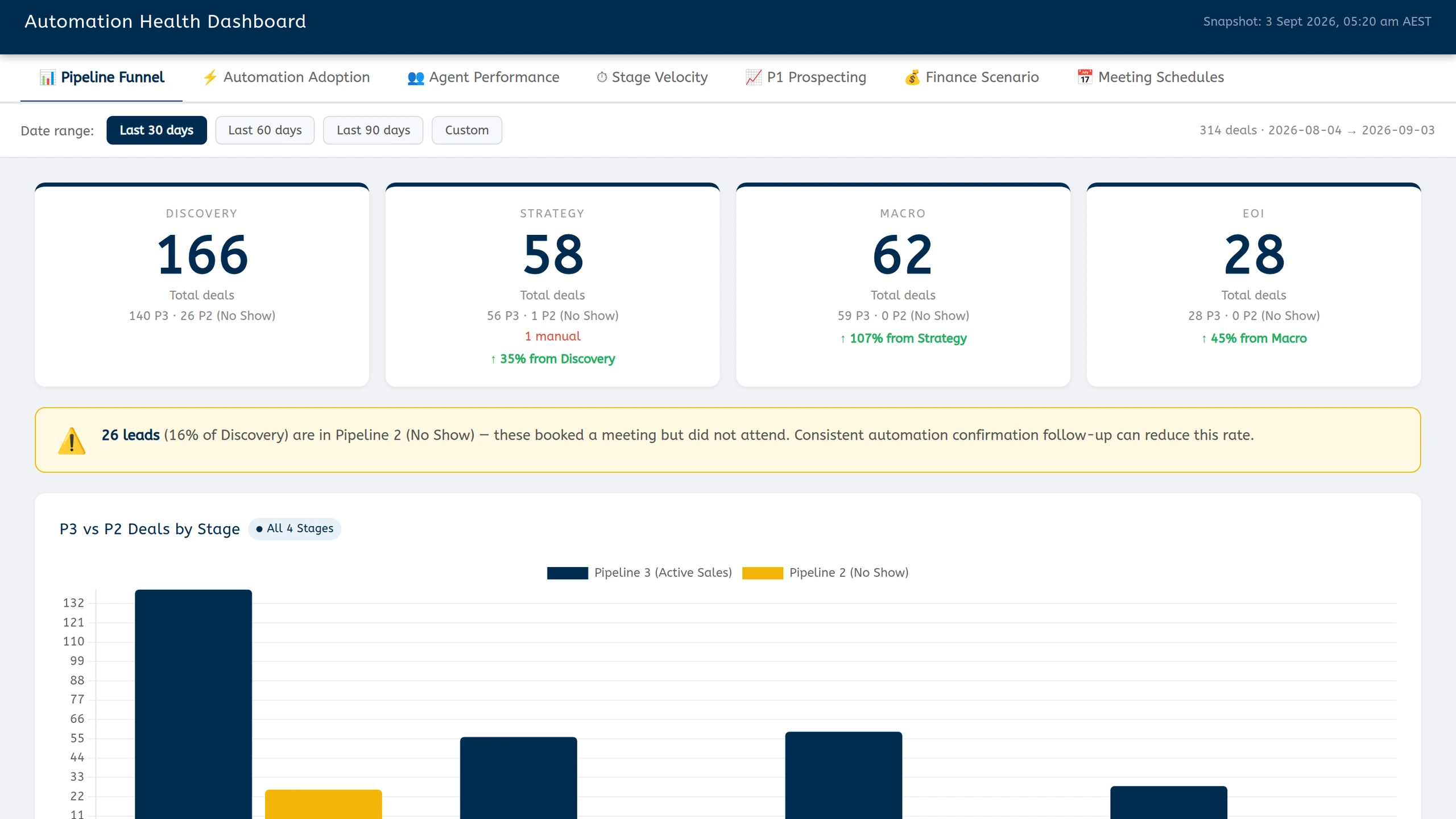
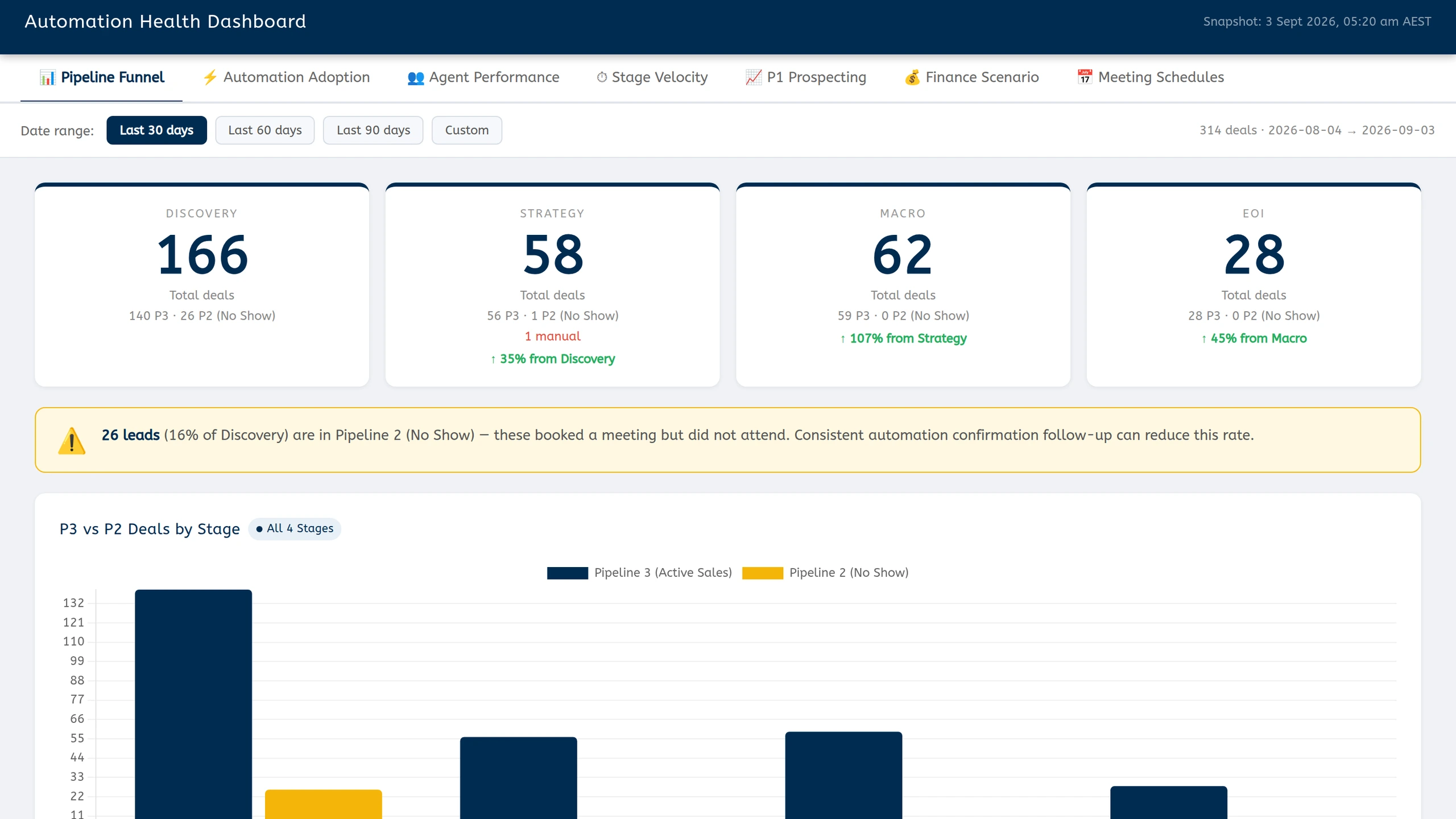
They asked for something their leadership could open on a Monday and trust. We built a dashboard over their live sales data with a tab per question. Where are deals sitting. Did the paperwork fire. Who is performing. How long is each stage taking.
The half that surprised people is the adoption tab. It does not report sales. It reports on us. Of 314 deals in the window, 313 have their form attached and 313 have a Drive folder, so the automation is either working or visibly not, on every single deal.
What to look at
- The funnel view flags 26 leads who booked a meeting and did not attend. Naming that as its own state is what makes it fixable.
- Every figure is read from the live sales data, so nobody is maintaining a second version of the truth.
If you take one thing from this build, take the adoption tab. Measuring whether your automation fired is worth more than another chart of the outcome it was supposed to produce.
System 03 · Stock decisions
The sheet that ends in a date
Our third client, a multi-region retailer, was reordering on instinct. Someone pulled exports, reconciled regions, and by the time the picture was assembled it was old enough that most reorders got made without it.
What they needed was not a prettier report. It was the same picture every week without anyone assembling it. So a daily sync keeps the numbers current, a tracker projects each product forward week by week, and a report lands in their chat every Monday.
The planner is the part their team actually argues over now. Set a revenue target, and it works out how many units each product has to move per week to hit it, whether current stock covers that, and the date you would have to order by given a 25-day lead time.
What to look at
- Cover is banded, not binary. Safe, watch, and reorder now each mean something different and say so on the line.
- It does not reorder anything. The report prepares the decision and the Monday meeting makes it.
A forecast earns its place when it ends in a date. Weeks of cover is a fact somebody has to interpret. Order by the fifth is a decision somebody can make.
The honest column
What we did not ship
Three builds ended the quarter deliberately switched off. One creator follow-up flow was finished and tested and then held, because the team that would own it was not ready, and shipping into an unready team is how good systems die.
One alerting rule went back for rework after its first week. It worked, but not accurately enough, and a wrong alert costs more trust than a missing one. And we built a monthly reporting automation for ourselves, watched it run, and switched it off within days, once we saw that the manual review it replaced was where the judgement lived.
Staged is a legitimate end state. It only looks like failure if you count launches instead of decisions.
Steal the shape
The three builds share a spine. None of it needs new tools, and you can put most of it in place before your next quarter starts.
Filter with boring rules before anything clever runs
Drop the noise deterministically, log every drop with its reason, and save the model for what is left.
Put a number on whether the automation fired
Not the outcome, the mechanism. A fire rate per stage tells you where a system quietly stopped working.
Make the output a decision, not a dashboard
An order-by date, a named queue, a recommended action. Something a person can act on without translating it first.
Keep a person on the last step
Draft, route, flag, prepare. Let people send, order and approve. That gate is why anyone trusts the rest of it.
The proof behind this issue
System 01 in full. The architecture behind the triage, the safeguards on every draft, and the honest outcomes of the first weeks of live use.
Case study
· Inbox automation
Founder Inbox OS
Seven inboxes and customer channels were feeding one overloaded team. We built a human-reviewed system that sorts every message, drafts the next reply and escalates anything that needs judgement.
7
mailboxes triaged
81
noise messages filtered in one morning
0
replies sent without human approval
Freckleberry
2026-06-18OpenClawn8nRailwayRead the case study → OpenClaw
Get the next issue in your inbox
Real systems we've shipped, with practical lessons you can use today.
Which of the three sounds like your week?
The inbox nobody has got to the bottom of, the automation nobody can prove is running, or the reorder nobody can defend. Tell us which one is costing you and we will show you what the fix looked like.
Keep exploring the Intelligence Library
Workflows
Three systems to install before Q4 planning
2026-07-01
Reporting & Dashboards
The weekly reporting cadence that ends "how are we doing?"
2026-06-17
Reporting & Dashboards
Sales Performance Dashboard
2026-06-27