Lim AI for Slack®
Bring your agency's KPIs into Slack®
Lim AI is a command center for growing agencies. The Lim AI Slack® app pushes automated reports, KPI monitoring, smart alerts, and daily/weekly summaries from your unified CRM, project, and ad dashboards into the Slack® channels where your team already works — so nobody has to log in to a separate tool to know how the agency is performing.

What the Slack® app does
Automated reports to Slack®
Schedule daily, weekly, or monthly reports from any Lim AI dashboard (CRM pipeline, project status, ad performance) and post them to the Slack® channel of your choice — no manual exports.
KPI monitoring
Pin the KPIs that matter (MRR, pipeline value, ad ROAS, project burn) and let the app post a snapshot to Slack® whenever a value changes meaningfully or on a fixed schedule.
Smart alerts
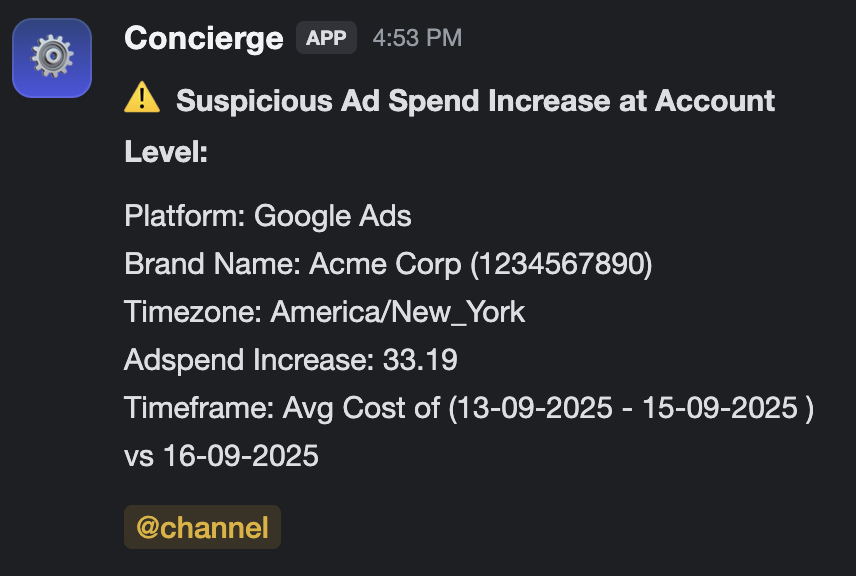
Get an instant Slack® channel post when a KPI crosses a threshold you define, e.g. ad spend exceeding budget, deals stalled, or projects past due.
Daily / weekly summaries
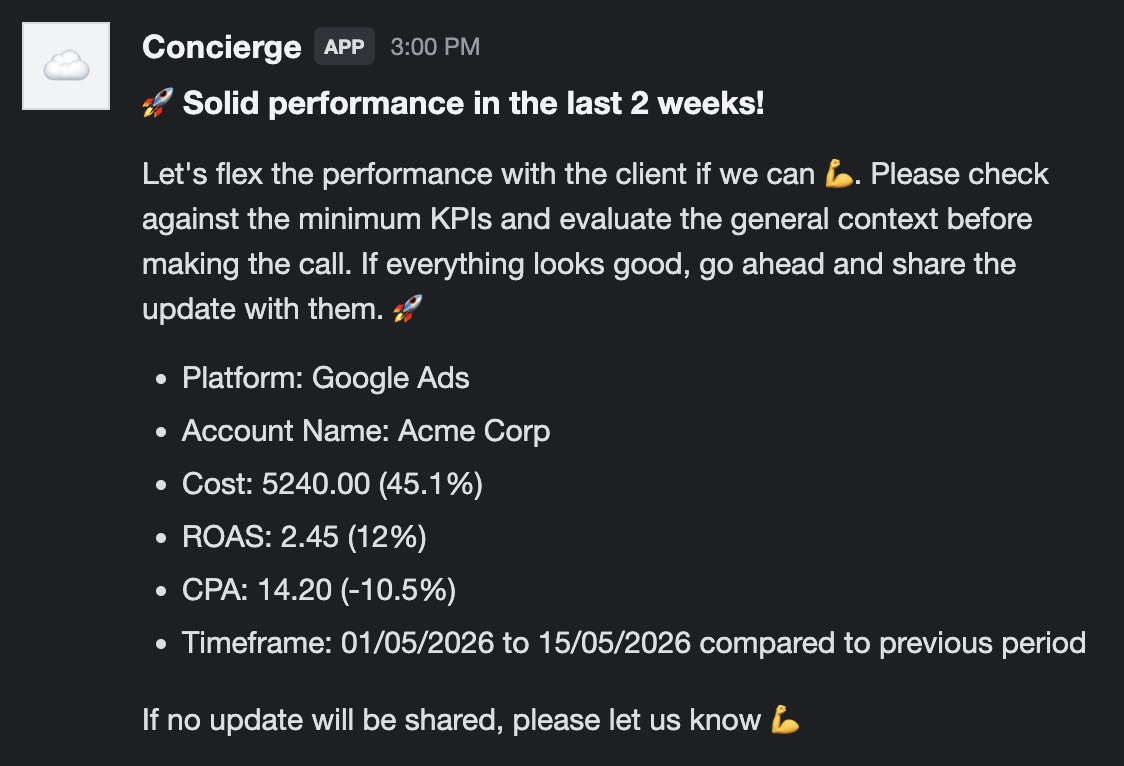
A short, readable digest of agency health (wins, blockers, KPI deltas) posted automatically into a channel of your choice every morning or every Monday.
Context-aware messaging
The app reads recent messages in the channels you configure so it can avoid sending duplicate alerts or contradicting an update your team just discussed in-channel.
Public channel posting
You can have the app post reports to a public channel without manually inviting it first, so onboarding a new channel takes one click.
See it in Slack®
Examples of messages Lim AI posts: a threshold alert when ad spend spikes, and a positive performance summary at the end of a reporting period.
How it integrates with Slack®
- 1
Sign in to Lim AI
Click "Add to Slack" above. You will be taken to Lim AI to sign in (or sign up) first.
- 2
Connect your Slack® workspace
From your Lim AI account, start the Slack® connection. You will be taken to the Slack® OAuth screen to review the permissions Lim AI needs and approve installation into your workspace.
- 3
Pick channels and KPIs
In Lim AI, choose which dashboards, KPIs, and alerts post to which Slack® channels, and on what schedule.
- 4
Receive reports and alerts in-channel
Your team will receive scheduled reports, KPI snapshots, alerts, and summaries posted automatically into the Slack® channels you configured.
Permissions Lim AI requests
We request the minimum Slack® scopes required to deliver the features above. Each scope and how we use it:
channels:historyRead recent messages from selected public channels to provide context-aware insights and avoid sending duplicate or conflicting alerts.
channels:readDisplay a list of available public channels so users can select where they want to receive automated reports and alerts.
chat:writeSend automated messages such as reports, alerts, and updates to Slack® channels selected by the user.
chat:write.customizePost messages with a contextual username and icon (e.g. "Lim AI Reports" for the weekly digest, "Lim AI Alerts" for threshold alerts) so workspace members can visually distinguish notification types at a glance.
chat:write.publicSend messages to public channels without requiring the bot to be manually added, improving user experience during initial setup.
groups:historyRead messages from private channels where the app has been explicitly added, enabling context-aware automation and reporting.
groups:readDisplay private channels that the app has been added to, allowing users to select them for receiving reports and alerts.
Pricing
The Lim AI Slack® app itself is included with every Lim AI subscription. Lim AI is a paid service: a fixed monthly rate is charged for the platform and the Fully Managed Dashboard Service (which includes monthly optimisation). For current plan pricing, contact hello@dashboard-lim.com or book a call from the main DashboardLim website.
Support & uninstall
Questions, bug reports, or help with the install? Email hello@dashboard-lim.com.
You can uninstall the app at any time from your Slack® workspace settings (Manage apps → Lim AI → Remove app). On uninstall we stop posting to your workspace and delete the associated tokens.